Whether you’re updating a dated kitchen, downsizing to a condo, or stocking a dorm room, picking the right refrigerator matters more than it sounds. An Insignia refrigerator sits at the intersection of affordability, reliability, and thoughtful design, the kind of appliance that quietly does its job without demanding constant attention or draining your wallet. Unlike luxury brands that bundle features you’ll never use, Insignia focuses on real-world durability and straightforward performance. This guide walks you through what sets Insignia apart, which models fit your space and budget, how to get one installed properly, and how to keep it running smoothly for years.
Table of Contents
ToggleKey Takeaways
- Insignia refrigerator models offer reliable, no-frills engineering at affordable prices, making them ideal for renters, small households, and budget-conscious homeowners who prioritize dependability over unnecessary smart features.
- Proper sizing and space measurement are critical—ensure at least 2 inches of clearance on both sides and verify actual dimensions match your kitchen opening, as nominal measurements often differ from reality.
- Let an Insignia refrigerator sit unplugged for 4 hours after delivery before plugging in to allow internal fluids to settle and prevent compressor damage.
- ENERGY STAR certified Insignia models use 15% less electricity than non-certified units, potentially saving hundreds of dollars over 10 years in utility costs.
- Regular maintenance—cleaning condenser coils every 6–12 months, checking door seals quarterly, and monitoring for unusual noises—extends the refrigerator’s lifespan and prevents costly repairs.
- Budget $150–$300 for professional plumbing if your kitchen lacks a water-line stub and you choose a model with an ice or water dispenser.
What Makes Insignia Refrigerators Stand Out
Insignia is Best Buy’s house brand, engineered for everyday kitchens where dependability and value matter more than stainless steel prestige. The brand has built a reputation on no-frills engineering: solid compressors, efficient cooling systems, and finishes that don’t show fingerprints every five minutes. You won’t find unnecessary smart features that need software updates, but you will find straightforward controls and shelving that actually fits real food.
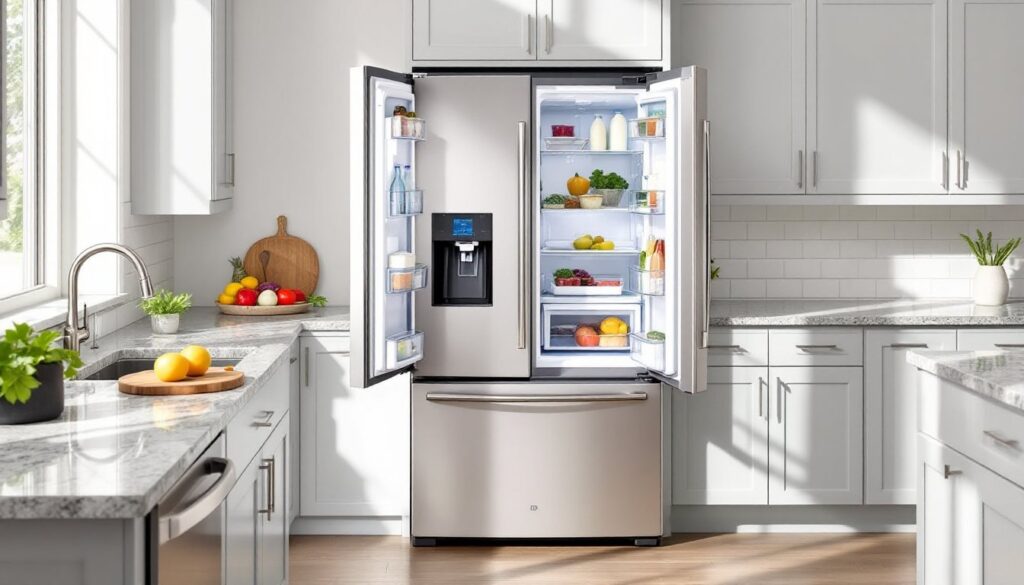
One strength is the breadth of configurations. Insignia makes compact top-freezers (perfect for tight apartments), side-by-side models for traditional kitchens, and french-door designs if you want that shelving style without the boutique price tag. Most units come in stainless steel or black finishes, both of which resist fingerprints better than glossy alternatives.
Key Features and Technology
Insugnias typically include adjustable glass shelves, which let you customize interior space to fit tall bottles or bulky containers without forcing everything into preset slots. The crisper drawers come with humidity controls, a simple mechanical dial, not a digital sensor, that does the job reliably. Freezer compartments are generous enough for a realistic family’s frozen goods, not a minimalist’s fantasy of pre-prepped meals.
Ice and water dispensers appear on many mid-range models, though be aware: these require dedicated water lines run during installation. If your kitchen doesn’t have a stubout already, hiring a plumber adds $150–$300 to your total project cost. Simpler models skip the dispenser entirely, which means fewer potential leak points down the road. Energy efficiency matters, Insignia models typically meet ENERGY STAR certification, meaning they’ll use about 15% less electricity than non-certified units. Over 10 years, that translates to real savings on your utility bill, especially if you’re replacing a refrigerator from the early 2000s.
Popular Insignia Refrigerator Models for Every Budget
Insignia’s lineup is stripped down compared to LG or Samsung, which is actually a selling point if you hate scrolling through 200 options. Entry-level models start around $500–$700 and cover basic refrigeration: a reliable compressor, decent temperature zones, and standard shelving. These are perfect for renters, garage fridges, or anyone who just needs cold food to stay cold.
Mid-range units ($800–$1,200) add french-door or side-by-side configurations, ice dispensers, and slightly more refined interiors. These are where most homeowners land, good balance between features and cost. Top-tier Insignia models ($1,300–$1,800) include larger capacities (22+ cubic feet), fancier finishes like “stainless look” that resists fingerprints better, and more precise temperature zones.
One particularly popular choice is the Insignia retro compact model, praised for dorm rooms and small kitchens. Per recent reviews on compact appliances for college students, the Insignia retro unit punches above its weight for tight spaces. If you’re furnishing a small kitchen or need a secondary fridge, check what capacity works: 3.1 cubic feet is genuinely compact, while 5–7 cubic feet still fits under most counters but holds noticeably more.
Choosing the Right Model for Your Kitchen
Start with your available space. Measure the width, depth, and height of your current fridge or the opening where the new one will go, write down nominal and actual dimensions. Refrigerators labeled 24 inches wide are often 23.5–23.8 inches in reality, and that 1/4 inch matters when you’re fitting it between cabinetry. Depth varies too: standard models are 30–32 inches deep (including the door handle), but some slimline units are 24–26 inches, which works if your kitchen doesn’t have a full-depth cutout.
Think about your usage pattern. A family of five running through groceries weekly needs at least 18–20 cubic feet. A couple or small household can get by with 15–17 cubic feet. Renters or anyone in a temporary situation might prefer a compact 7–10 cubic foot unit. More freezer space, less fresh storage? Side-by-side models split the capacity 50/50. Want easier access to fresh food? French-door designs give you wider shelves and shallower depth in the fridge section.
Floor plan matters. Refrigerators pull cold air from the back and sides, so they need breathing room, at least 2 inches of clearance on both sides and 1 inch at the top. Tight fit against a wall or corner can choke airflow and force the compressor to work harder. If your kitchen layout is constrained, check the model’s door-swing angle: some right-hinged units can be converted to left-hinge, which opens up options. Also verify that door clearance lets it swing fully, a fridge in a galley kitchen where the door swings into a breakfast nook can be frustrating. Reviews on mini fridges and small spaces can give you insight into real-world fit challenges if you’re working with unusual layouts.
Installation and Setup Tips for Homeowners
If you’re replacing an existing fridge, the basic procedure is straightforward: unplug the old unit, disconnect the water line (if it has a dispenser), and slide it out. New Insignias come with a water-line kit, but you’ll need to decide whether to tap into the cold-water line under the sink or run a new stub from the main line if one doesn’t exist. For a dispenser model, plan to spend 2–3 hours on installation if you have a convenient water source. If you need a plumber to run a line, factor in the extra cost and lead time.
Before rolling in the new unit, clean the space thoroughly. Sweep out crumbs and dust, and make sure the floor is level, uneven flooring can cause doors to close improperly or shelves to shift. Measure the opening one more time against the new fridge’s dimensions. If you’re downsizing to a compact model and closing off a space, you might add a removable cabinet cover or decorative panel so the gap doesn’t look awkward.
Slide the new refrigerator into place slowly, watching for carpet or floor trim underneath. Once it’s positioned, leave it unplugged and let it sit for 4 hours before turning it on. This allows any fluids in the compressor (coolant residue from shipping) to settle, preventing damage when the compressor starts. Don’t skip this step. After the waiting period, plug it in and set the thermostat. Most Insignias have a dial marked 1–7 (coldest to warmest): start at 3 or 4 for normal refrigeration. Let the unit run for a few hours before loading food, so temperatures stabilize.
Maintenance and Care Best Practices
A refrigerator is one of the few appliances that runs 24/7, so preventive maintenance extends its life and keeps it efficient. Clean the condenser coils, the metal fins on the back or underneath, every 6–12 months using a refrigerator coil brush or a soft-bristled attachment on a vacuum. Dust buildup forces the compressor to work harder, which burns energy and generates unnecessary heat. If your Insignia has a dispenser, flush the water line with drinking water monthly or quarterly: standing water in lines can breed mold or mineral buildup.
Wipe down rubber door seals quarterly. They trap moisture and debris, which can lead to cracks that let cold air escape and force the compressor to cycle more. A damp cloth with a little white vinegar works, no harsh chemicals needed. Check that the door closes completely and seals properly: if it won’t latch, the seal may be compressed or the cabinet might be out of level again.
Inside, wipe down glass shelves and drawers if spills happen, and don’t use abrasive scrubbers that scratch the surface. Keep the interior at the manufacturer’s recommended temperature (usually 37–40°F for the fridge section, 0°F for the freezer). Warmer settings save energy but risk food spoilage: colder than specified wastes power. If your refrigerator makes unusual noises, grinding, clicking, hissing, don’t ignore it. These can signal compressor stress or coolant issues, and addressing them early prevents catastrophic failure. Most Insignia warranty periods cover parts for 1–3 years depending on the model, so check your paperwork and register your unit for extended coverage if available. One more tip from kitchen organization and appliance reviews: avoid storing heavily scented items directly against other foods, and keep the fridge about 75% full for optimal air circulation.
Conclusion
An Insignia refrigerator won’t dazzle you with cutting-edge features, but it will do what you bought it for: keep food cold, handle daily use, and last through years of kitchen life without surprises. Choose your model based on space, capacity, and honest usage, not on bells and whistles you’ll rarely touch. Take your time with installation and setup, follow the waiting period before power-on, and stay on top of basic maintenance. A small investment in coil cleaning and seal checks now saves hundreds in emergency repairs later.